
01
Open documents
Open .udf documents directly, whether they arrive by email or are stored on your device. Turkish characters, tables, headers and footers, and embedded images appear as they are.
UDF360 — by DRN
Open and edit the .udf documents used in UYAP on your phone, and sign them with your mobile signature or e-signature card. You do not need to go back to a computer.
UDF360 does not access UYAP Avukat Portal automatically: you sign in to the portal yourself and you submit the document yourself.
What it does
Open and edit your UDF document on your phone; sign it with your mobile signature or e-signature card.
Open .udf documents directly, whether they arrive by email or are stored on your device. Turkish characters, tables, headers and footers, and embedded images appear as they are.
Write a petition from scratch or edit an existing document. Paragraph format, alignment, font and font size, tables, images, headers and footers.
Sign with your Turkcell, Vodafone or Türk Telekom mobile signature. All you need to do is approve the request that arrives on your phone. You can also sign with your e-signature card.
Check that a signed document you have received really has not been altered. When the app says “verified” (“Doğrulandı”), it also tells you what was verified.
You can save and share the document you edited or signed. Content that the app does not recognize is not deleted; it is written back as it is when you save. To sign, your mobile signature must be active with your mobile operator; to sign with an e-signature card, a card reader is required. Available functions may vary depending on the app version and your device.
What you need to use it
To sign, you must be at least 18 years old, sign in to your personal account, accept the current Terms of Use and complete your profile. Phone and email verification are mandatory; at your first signature, your identity details are matched with your signature certificate. Signing requires an internet connection.
1 signature credit = 1 signature. No credit is deducted for a signature that is not completed. When you start editing a document that comes from outside, however, 1 signature credit is deducted as a document ticket and covers one signature of that document; it is not given back even if you give up editing or the signature is not completed. While PRO is active, signature credits are not spent. Signature credits are not sold; they are granted as gifts. For eligible actions, you can get a single-use signature token, valid for 30 minutes, by watching an ad; this token is not added to your balance and does not accumulate. You can get at most 5 tokens per day through ads. PRO can be obtained with a monthly or yearly store subscription or as a gift.
When you verify your email address, 3 signature credits are given once. In the current campaign, every account that completes identity verification is PRO until the end of 30 November 2026 (Türkiye time); PRO starts at the moment identity verification is completed (at your first signature). Identity verification is not required for accounts opened before this text took effect or accounts that accepted the previous text of these terms; these accounts are also PRO until the same date. Of the accounts that complete identity verification, the first 100 get 6 months of PRO. The same person cannot receive this gift a second time. The gift PRO is not a paid subscription and does not renew automatically. For details of the campaigns and their current terms, read Terms of Use §3–6.
Limited time
This is a campaign we started so that you can get to know UDF360. The general terms of signature credits, PRO and gifts are explained above; here we only summarize the launch campaign itself.
Every account that completes identity verification is PRO; PRO starts at the moment identity verification is completed (at your first signature). Identity verification is not required for accounts opened before this text took effect or accounts that accepted the previous text of these terms; these accounts are also PRO until the same date. This is a trial period; it is not a paid subscription and does not renew automatically. The launch value of PRO for this trial period is TRY 39.99 (VAT included); a no-charge delivery invoice is issued and no payment is collected from you.
The first 100 accounts that complete identity verification are given 6 months of PRO, starting from the moment of completion; once per person, with no automatic renewal. The launch value of 6 months of PRO is TRY 159.99 (VAT included); a no-charge delivery invoice is issued and no payment is collected from you.
The 3 signature credits given at email verification and the signature credits gifted by an admin have no monetary value; no invoice is issued for them.
Mobile experience
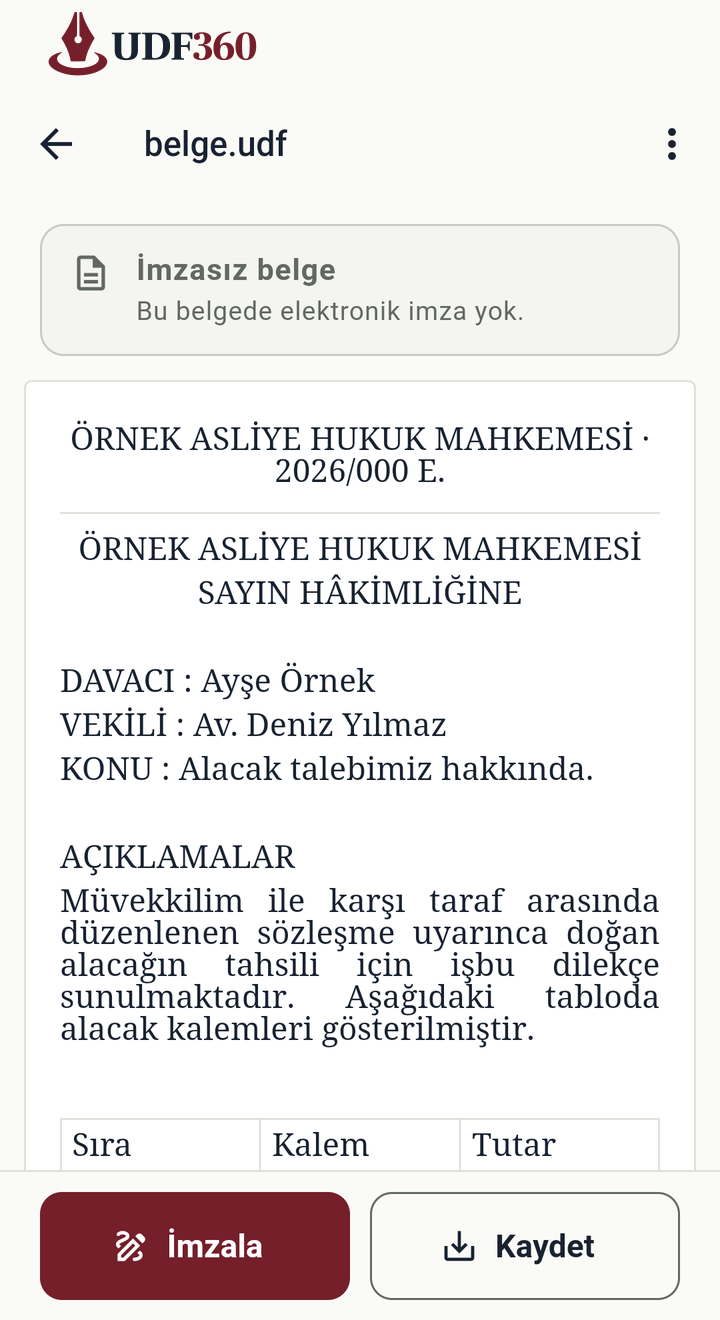
View a document, edit its content and move on to the signing step.

Review tables and the document layout on your phone.

Edit text, paragraphs and tables inside your document.

Choose your mobile operator and approve the signing request that arrives on your phone.
These screenshots were taken from a real device. The people and institutions in the documents are fictional.
Signature verification
When UDF360 verifies a signature in a document, it shows the result on a status card. You can see the signer information here and open the details.

A test display of the real status card component in the app, prepared with the fictional “ÖRNEK İMZACI” (SAMPLE SIGNER). It is not a device screenshot or proof of verification of a real signature.
Where your document stays
The document itself never reaches us. In the mobile signing step, the document content is sent over an encrypted connection to UYAP’s own mobile signature service so that it can produce the signature. When signing with an e-signature card, the document never leaves the device.
About privacyPrivacy inside the app
Find your usage statistics preference and card transaction logs in Settings (Ayarlar). Read where your document is processed in the app’s privacy panel.

The usage statistics preference and card transaction logs are in the same section.

A view from the panel that explains the data flow while processing and signing documents.
Both images were taken from a real device. The part of the panel visible on screen is shown.
If you have questions, take a look at the Support Center; you can also write to us from within the app.